Assemble your game's meta from ready modules. Write the missing ones.
Pick stores, quests, seasons and more from the marketplace; you or your AI agent write what is unique to your game. Everything goes live with its admin pages, calendar and player history already there. No backend team. No reward paid twice.
Every event waits for a build
A weekend sale, a new quest line, a season: each one waits for engineers to build the backend and its admin pages, then for a release. Your LiveOps calendar moves at the speed of your backend team.
And when it ships, a retry after a timeout or a double tap pays the reward twice. A dupe inflates a live economy in hours, and support spends the week rolling players back by hand.
Three steps to a live meta
Most of a game's meta is the same from game to game. Take that part ready and spend your engineers on what makes your game yours.
- 1
Pick modules
Install stores, quests, leaderboards and more from the marketplace. Each one comes with its rules and its Dashboard pages.
-
 Stores
-
 Quests
-
 Leaderboards
-
 Inventory
-
- 2
Write the missing ones
What is unique to your game, an engineer or an AI agent writes as a module with the Module SDK. It builds on the ready ones: a purchase counts toward a quest, a win grants an item.
- Claude Code
- Codex
- Cursor
- by hand
- 3
Go live with admin pages
Publish to staging, check it, promote to production. Designers edit catalogs, plan the calendar and help players in the Dashboard, without waiting for a build.
Staging Production
From a module to a purchase in 79 seconds
Install a store, plan an offer, publish it, and watch players buy it in the game.
Your team runs the game, not the backend
Every module brings its pages. Nobody builds an admin panel, and nobody waits for a build to change a price.
The LiveOps calendar
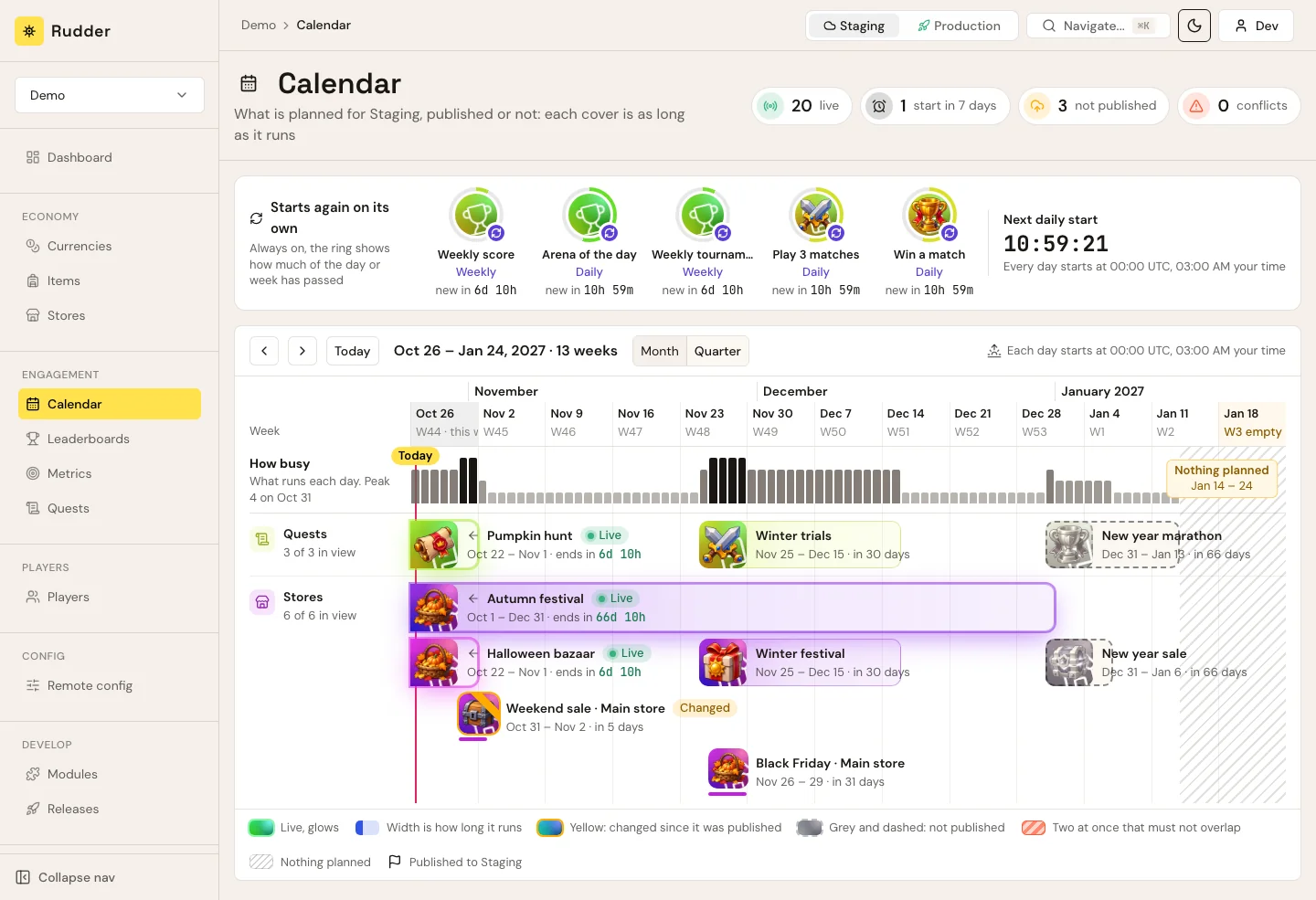
Every quest, store and event of the quarter on one timeline: what is live, what starts next week, what is not published yet, and the two sales that must not overlap.
A store and its offers
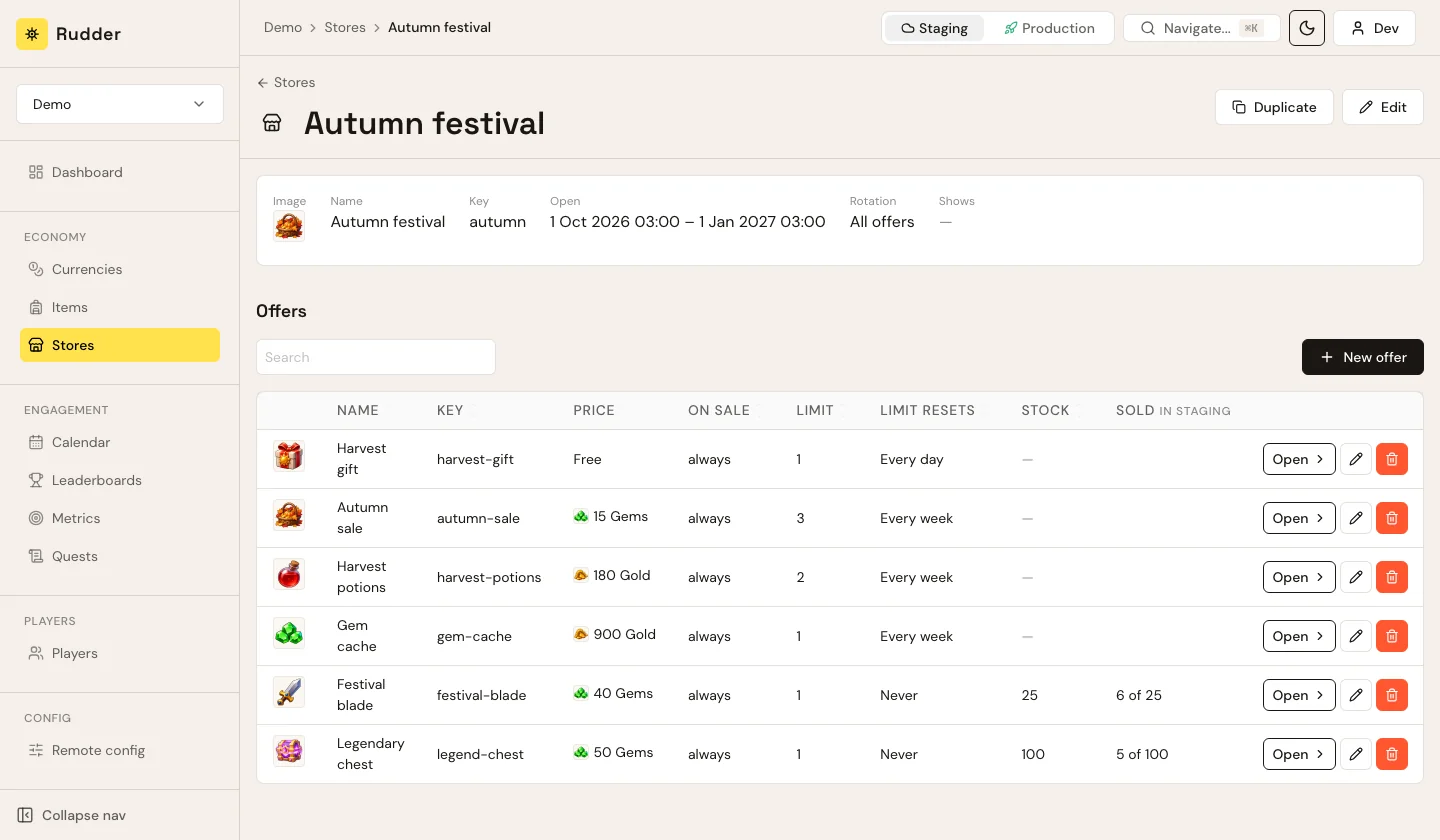
A designer opens a store, sets its window, adds offers with prices, limits per player and a stock shared by all players, and sees "Sold 5 of 100" as players buy.
A player's history
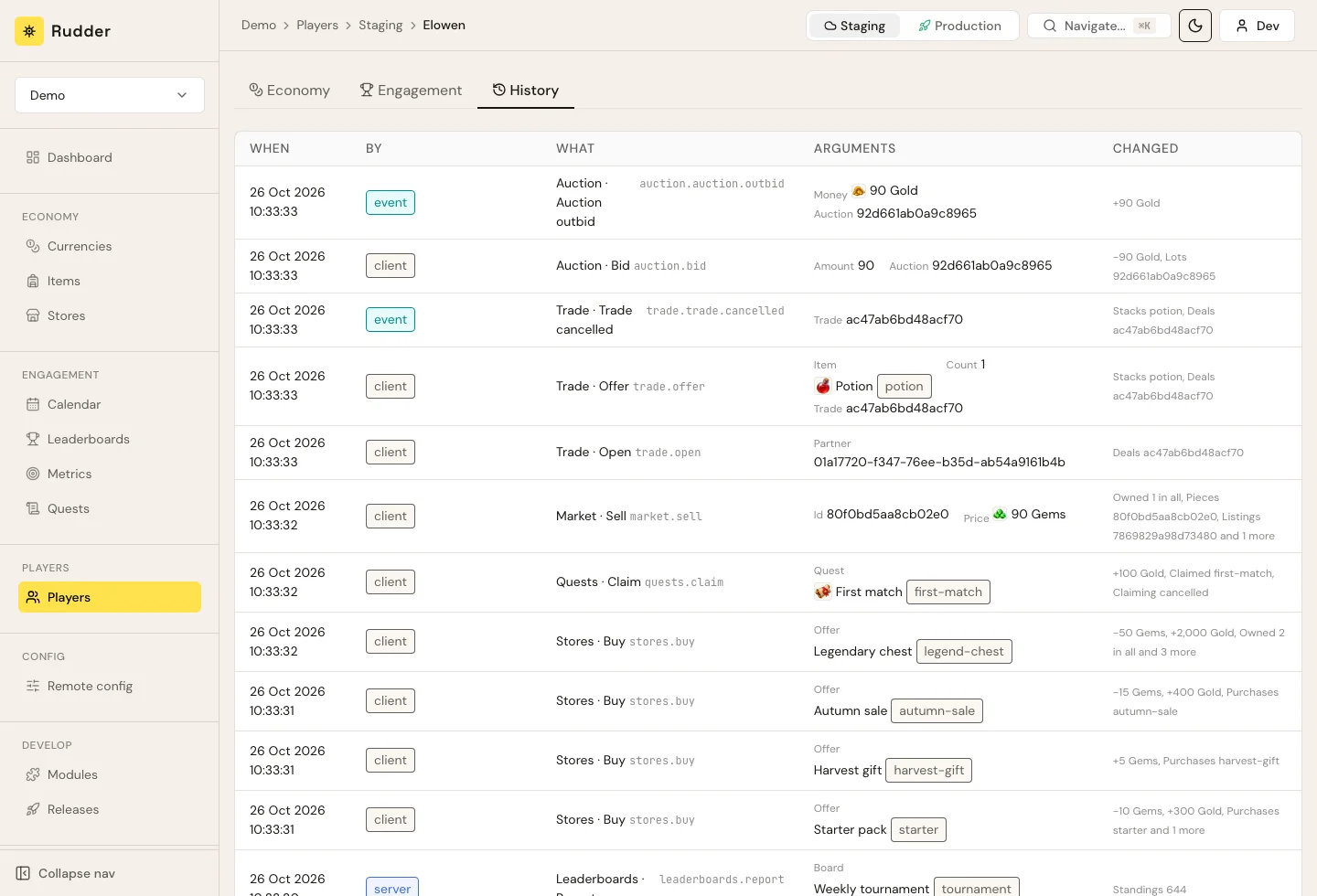
Support sees everything that changed for a player, who did it and what it changed: a purchase, a claimed quest, a refund of an outbid. Then grants, takes, bans or restores in a click.
The accounts players already have
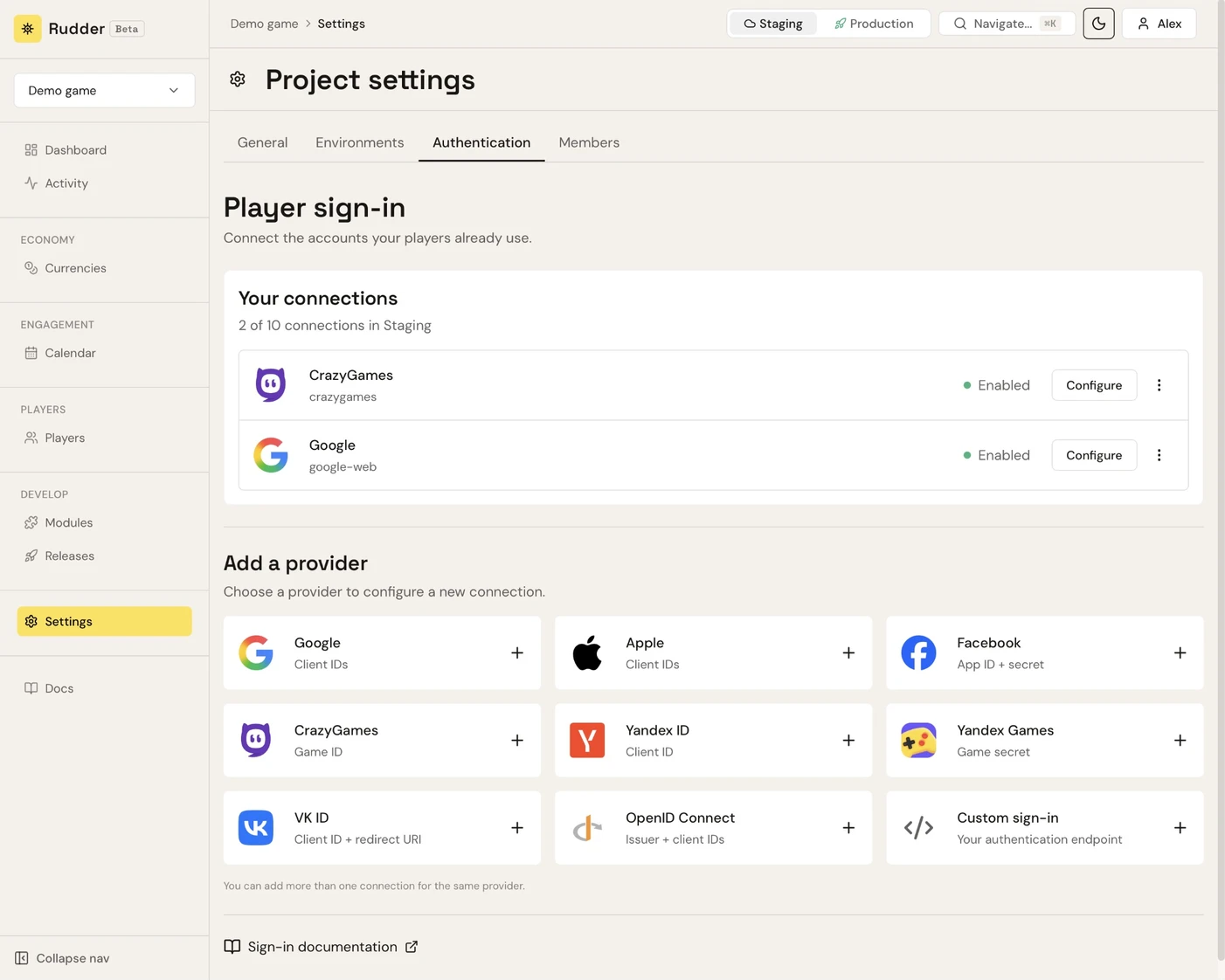
Enable Google, Apple, Facebook, CrazyGames, Yandex, VK or any OIDC provider in project settings. Sign-in is one call from the game and the platform checks the token, so you run no auth service. Accounts link into one player; anything else is a custom sign-in.
The meta every game needs, ready
Install a module and its pages are in the Dashboard. Your designers fill it; your game calls it.


 150
Stores open for a window and rotate their offers every day or week. Offers with an old price, a limit per player and a stock all players share.


Daily, story and event quests with objectives and rewards. Chains, repeats every day, week or month, rewards that claim themselves.



Daily, weekly, monthly or all-time boards, highest score first or fastest time first. Scores from the client or only from your game server.
- Inventory
Stackable items with a cap and unique items with their own stats. You decide which ones players may trade.
-
 Player market
Players list items for a price and others buy them. A fee you set drains currency out of the economy.
-
 Auctions
The highest bid by a set time wins. An outbid player gets the money back at once.
-
 Trades
Two players swap items and currency. Nothing moves until both confirm the final deal.
-
 Remote config
Switches, numbers and texts your game reads, different in staging and production.
- Seasons and battle pass Soon
Levels earned by playing, with free and premium rewards on each level.
The Module SDK
A module is a few plain functions over typed game data: wallets, items, counters, timers, catalogs a designer edits. Your code says what the feature does; the platform keeps the promises below.
//rudder:mutation
func (player *Player) Buy(arguments BuyArguments) (OfferState, error) {
	offer, ok := offers.Get(arguments.Offer)
	if !ok {
		return OfferState{}, ErrUnknownOffer
	}

	if !onSale(offer) {
		return OfferState{}, ErrNotOnSale
	}

	if err := player.Wallet().Pay(offer.Price); err != nil {
		return OfferState{}, err
	}

	if err := player.Stock().take(offer); err != nil {
		return OfferState{}, err
	}

	player.Wallet().Grant(offer.Currencies...)
	purchased.Emit(Purchased{
		Offer: offer.Key,
		Store: offer.Store,
		Price: offer.Price,
	})

	return player.stateOf(offer), nil
}-
 A call changes all or nothing
If the stock is sold out after the price was paid, the purchase is refused whole and the player keeps the gems.
- A retry never pays twice
The game sends a key with each call. The same key again gets the same answer, and nothing runs a second time.
- A module that fails changes nothing
An error in your module, or in a ready one it calls, leaves the player as they were.
- Staging, then production
Every release goes to staging first. Promote it when it is right, roll it back if it is not.
- Tests behave like production
A module is tested on a laptop in seconds, with time you control, and behaves the same live.

AI agents write modules. A module declares its data and its catalogs, the SDK generates the types from them, and the tests run locally. That is a loop Claude Code, Codex or Cursor closes on its own: describe the feature, review the module, publish it to staging.
One module, its whole product
Describe your mechanic to an agent. The module it writes declares its pages, its view of a player and its actions, and its functions do the work. Publish it, and the Dashboard and your game client have them.
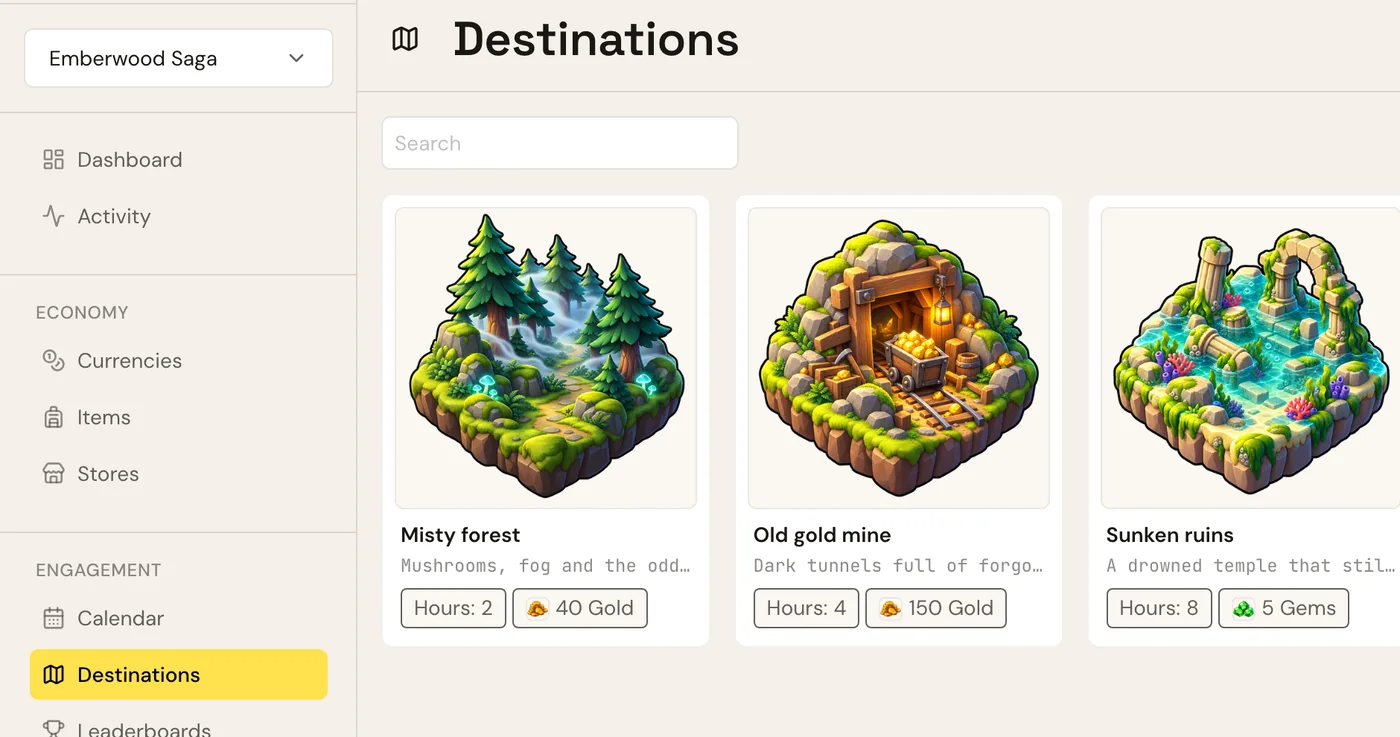
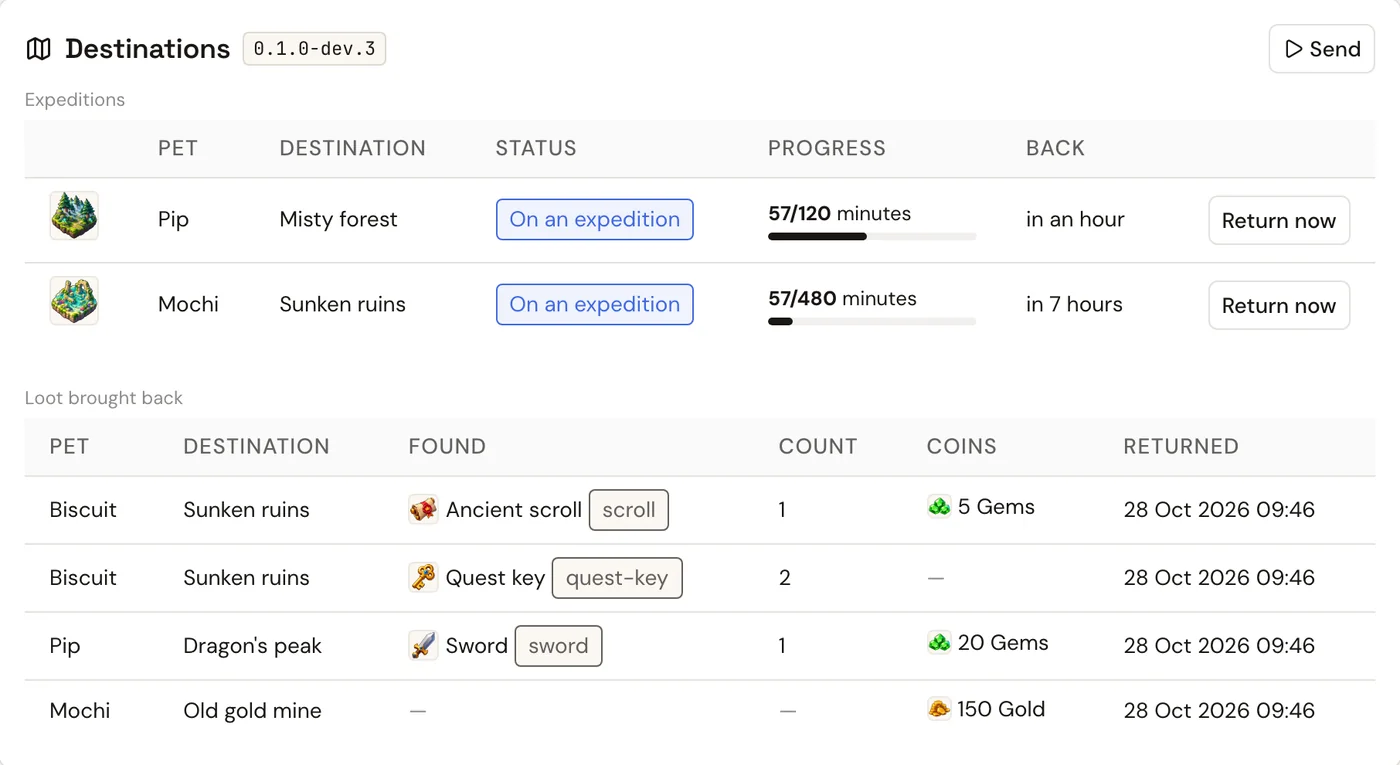
Add expeditions: a player sends a pet on a timed trip and it comes back with loot. Designers set the destinations, each with a duration and its loot. Support can send a pet or bring it back early.
Writing the module expeditions… - 1
 Catalog · Destinations a page designers edit
- 2
 Player view · Expeditions a block on the player card
- 3 Action · Send a form for support
- 4
 Client call · send() typed, in your game client
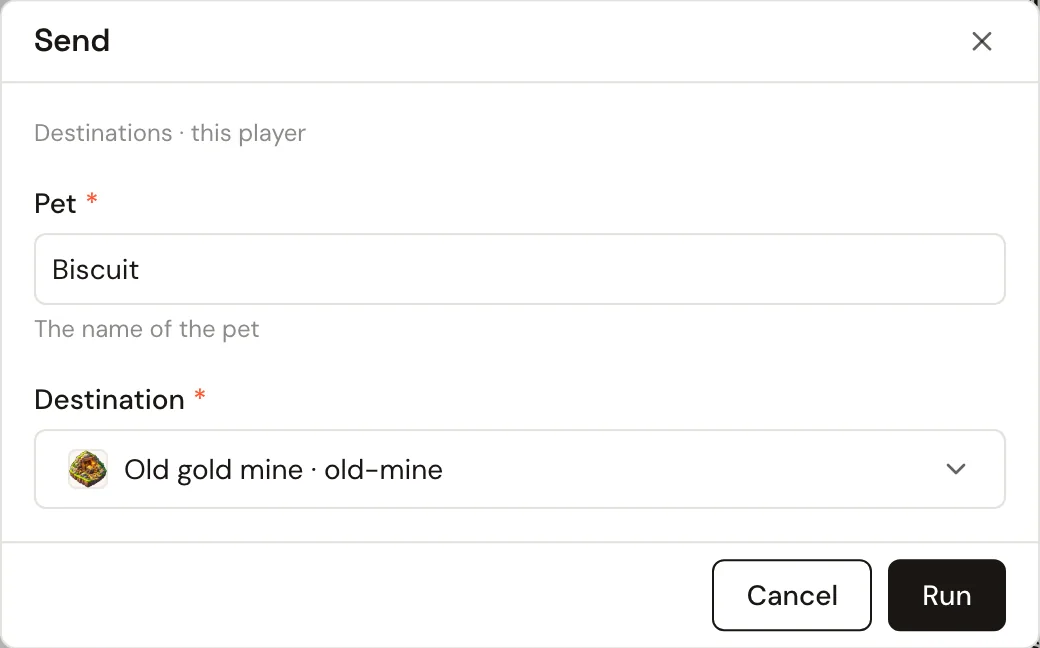
await rudder.expeditions.send({
  pet: 'Biscuit',
  destination: 'old-mine',
})
Launch your next event with us
We work closely with a few studios while the marketplace grows. Tell us what you want to launch; we build it with you.
Pricing
Free for design partners. Then a fee per project plus active players.
You get
- your first modules built together with your team
- a direct line to the engineers who build Rudder
- a say in what the marketplace gets next
We ask
- a live or soon-live game
- an event, a store or a season you want to launch
- honest feedback, often
Ship your next event without a backend sprint
Ready modules for the meta every game needs, your own for the rest, and the pages to run them from day one.
Become a design partner